12 Common Alen Air Purifier Problems (and How To Fix Them)

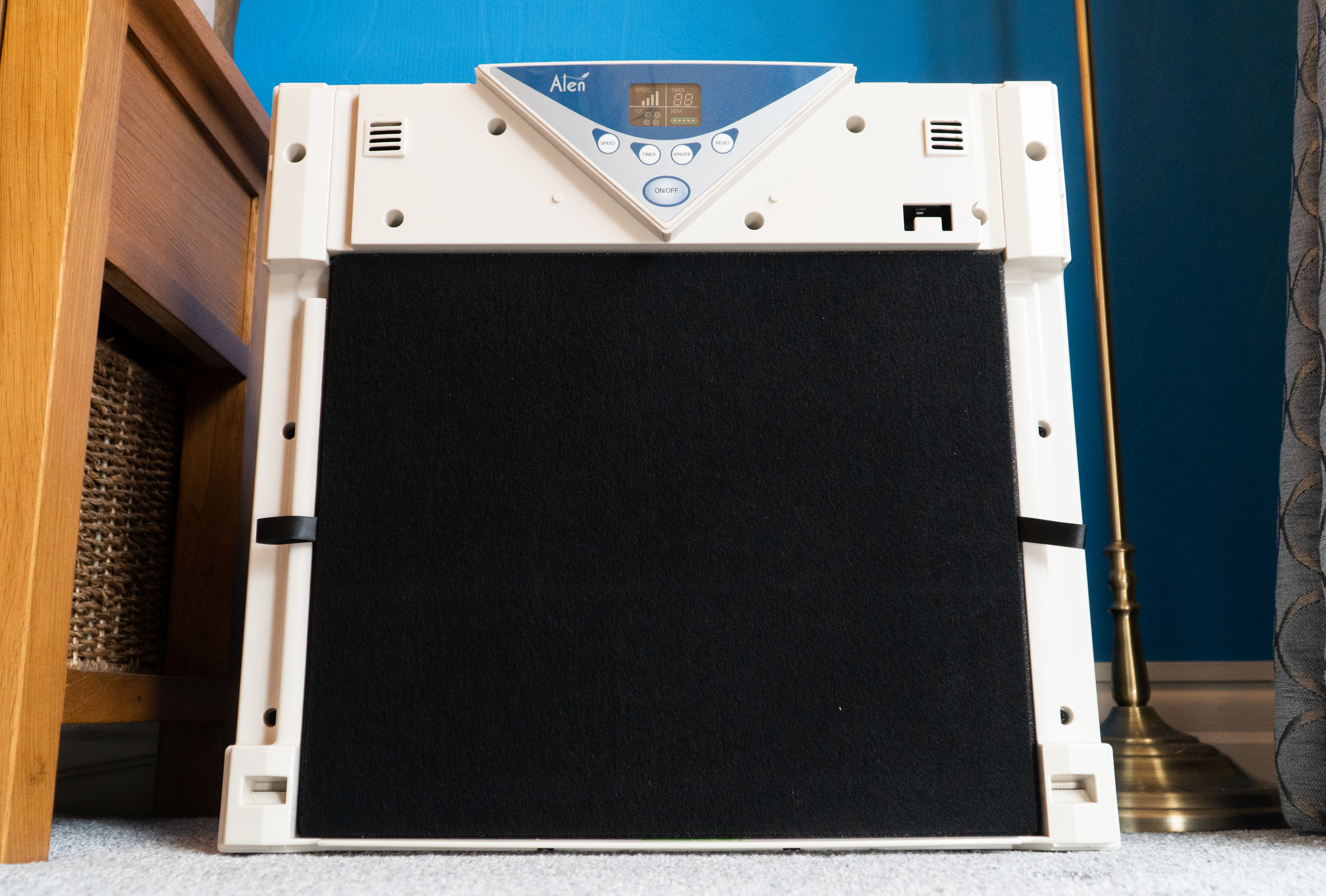
AlenA350 3

Based in Austin, Texas, the Alen Corporation is one of the most trusted producers of high-quality air purifiers. We’ve long been fans of their units, including the BreatheSmart 75i for large spaces and the BreatheSmart 45i for smaller rooms. There’s also the a350 which is sadly no longer for sale, although you can still buy their filter replacements

However, Alen units don’t always work perfectly, as with all mechanical devices. But the good news is that most problems can be easily solved. We’ll give you top tips on how to fix the most common issues, such as what to do if the red light won’t turn off. 

You’ll also find guidance about the correct power supply and ideal room size for each unit and how to contact Alen directly when all else fails.

Problem 1: My Alen Air Purifier Won’t Turn On

There can be many reasons your purifier won’t turn on. Be sure to check for the following:

Is the cord plugged in correctly?

Ensure this is plugged in well and that you use the right outlet.

Is the power cord faulty?

If this is the case, you will need to replace it. You should be able to buy this direct from the Alen website.

Is there a blown fuse?

If the fuse is blown, it will need to be replaced. It’s possible to do this yourself, but we recommend contacting customer support on the Alen website for guidance. 

Is there a problem with the wall socket?

There may not be any issues with your unit; the wall socket might be the problem. Try plugging the purifier into another outlet; hopefully, this should work. 

Is the power rating correct?

Be sure to check that the power rating of your unit is the same as your wall socket. If not, your cleaner won’t turn on. 

Check using our handy table below:

Air PurifierPower Supply Rated Power 
Alen BreatheSmart 75i True HEPA 120 AV, 60HZ (3 Prong Power Cord)1.8 to 45 watts
Alen BreatheSmart 45i True HEPA120 AV, 60HZ (2 Prong Power Cord)1.1 to 50 watts
Alen BreatheSmart Classic True HEPA120 AV, 60HZ (2 Prong Power Cord)1.6 to 105 watts
Alen BreatheSmart FIT50 True HEPA120 AV, 60HZ (3 Prong Power Cord)1.2 to 60 watts
Alen BreatheSmart FLEX True HEPA 120 AV, 60HZ (2 Prong Power Cord)0.8 to 50 watts
Alen T500 True HEPA Tower Air Purifier120 AV, 60HZ (2 Prong Power Cord)0.8 to 53 watts

Note: It’s also possible that you may have accidentally bought the wrong version of the cleaner. For example, the European model won’t work in the U.S. 

Problem 2: Air Purification Isn’t Working 

❓ Is the room coverage too large?

Using the purifier in a room larger than 300 square feet can lead to persistent poor air quality. Be sure only to use it in the recommended room size.

Air PurifierIdeal Room Size in Square FeetIdeal Room Size in Square Meters
Alen BreatheSmart 75i True HEPA 1,300 120.77
Alen BreatheSmart 45i True HEPA80074.32
Alen BreatheSmart Classic True HEPA1,100102.19
Alen BreatheSmart FIT50 True HEPA90083.61
Alen BreatheSmart FLEX True HEPA 70065.03
Alen T500 True HEPA Tower Air Purifier50046.45

Is the filter installed correctly?

To check this, you need to open the unit and ensure the filter is correctly pushed until you hear a clicking sound. This tells you that the filter is in place and your purifier should work as expected.

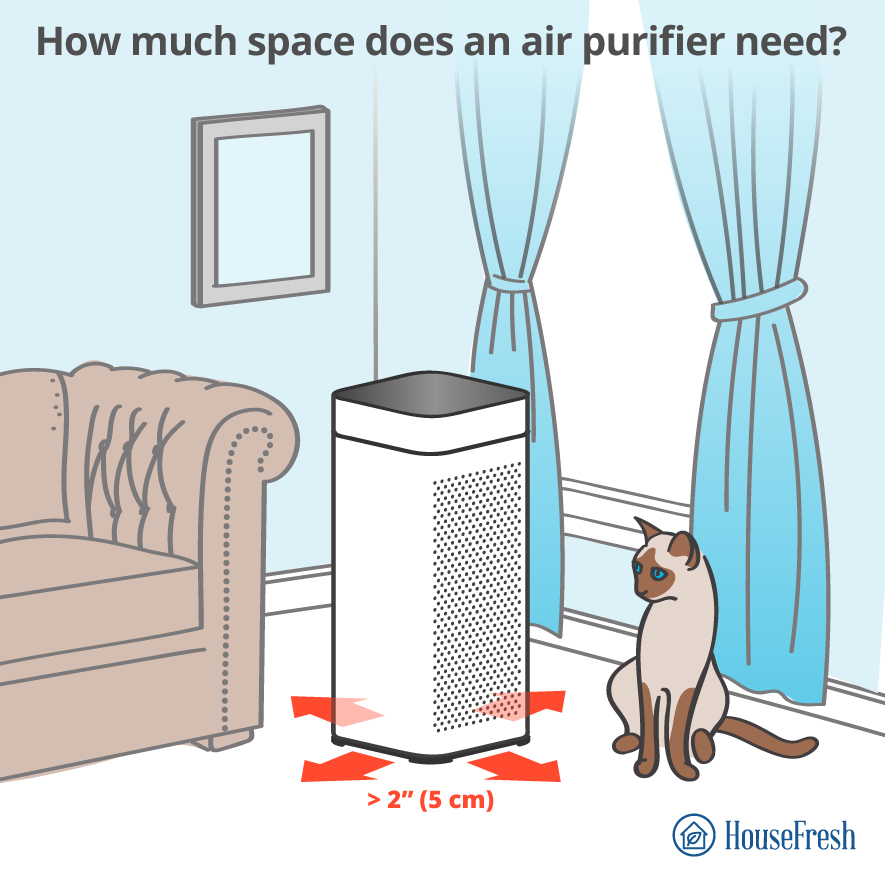
❓ Is there a lack of clearance?

Reduced airflow can occur if the air intake and outlet are too close to objects. Simply change your purifier’s location to leave more space around it. 
Air Purifier distance 1

Problem 3: The Red Light Is Always On

A red light often indicates a maintenance issue and is often connected to the purifier’s filter. Let’s take a closer look.

Is it time to replace the filter?

It’s recommended to replace HEPA filters every six months as they can become clogged with debris. Here’s our step-by-step guide on changing the filter for a model such as the Alen BreatheSmart FIT50:

  1. Make sure your purifier is unplugged.
  2. With both hands, pull on the cover near the intake vents (ensure the unit is upright). This will release the magnets and remove the cover from the unit.
  3. To remove the used filter, pull the white tab gently. It’s a good idea to place this in a plastic bag as it’ll help to prevent harmful particles from re-entering the air.
  4. Remove the packaging from the replacement filter. Carefully insert the bottom of the filter first before pushing the top into the air purifier. Be sure to do this until the filter fits snugly.
  5. Put the cover back on.
  6. The final step is to reset the filter indicator. Turn on the purifier and hold the filter button for five seconds. The light above the filter should now reset to green.

Problem 4: My Alen Air Purifier Keeps Beeping

While it can be a nuisance if your unit keeps making noises, it’s usually something that can easily be rectified.

Does the unit need resetting?

In most cases, resetting the device will stop the beeping. Here’s how to do it:

  1. Find the filter button (usually located near the power button).
  2. Press and hold the filter button for at least 5 seconds. 
  3. Now turn the purifier back on; hopefully, the beeps will be gone.

Alen reset

Does the filter need replacing?

If resetting didn’t work, then it could be that you simply need to change the filter. Follow our guide on how to do this from above.

Problem 5: The Fan Isn’t Working

If the unit’s fan isn’t working correctly, it will impact the whole purification process.

Is there a problem with the motor or the blades?

If you suspect this is the case, contacting Alen customer support for advice and help is best.  Call them on +1-800-630-2396, use their chat function via their website, or fill out their online form.

Is the fan working at all?

If the fan has stopped working, you may need to replace the unit entirely. Again, you can contact customer support for their guidance.

Has a fuse blown?

You can test this by unplugging the unit, waiting a minute or so and then plugging it back in. If there is a blown fuse, this will need to be replaced, as we mentioned earlier.

Problem 6: The Filter Light Keeps Blinking

If there’s an issue with the filter light, don’t worry, as it’s usually nothing too serious.

Have you inserted the replacement filter correctly?

Remove the filter and try replacing it again. If it’s still blinking after you’ve tried this, there may be a problem with the new filter. Be sure to contact customer service for help.

Is your purifier showing an error code?

In this instance, it’s best to contact Alen customer support, who can help you troubleshoot the problem.

Problem 7: My Alen Air Purifier Isn’t Circulating Air

Your purifier must be able to circulate the air properly, yet sometimes this feature can malfunction. 

Is there a problem with the fan?

Firstly, check to see if the fan is spinning. If it seems to be running too slowly, you may need to adjust the speed. If the fan isn’t spinning, unplug the unit and check for any blockages. This includes in and around your unit where the air blows out.

Is there an issue with the motor?

You’ll need to contact customer support if this is the cause, as they can arrange a replacement.

Is there anything covering the fan?

You should always ensure that nothing is covering the fan, as this can lead to overheating and potentially damage your purifier.

Problem 8: The Air Quality Monitor Isn’t Working

It’s essential to monitor the air quality in your home via your device. But if this feature isn’t working correctly, the reasons are often quite simple.

Is there something blocking the sensor?

Be sure to check if anything is obstructing the sensor, and don’t forget to remove any dust or debris that may have been collected. 

Problem 9: My Alen Air Purifier Won’t Connect to Wi-Fi

To ensure your device runs smoothly, it’s essential to have good connectivity. 

Are you using the right network for your unit?

As Alen states, “the BreatheSmart 75i and 45i only support 2.4 GHz (not 5 GHz) Wi-Fi networks.” 

There are a few ways to identify your network’s GHz for Android and Mac devices.

  • Android: Go to the ‘Settings’ app, tap the Wi-Fi network name and locate the ‘Frequency’ value. 
  • Apple: Hold down the ‘Option’ and ‘Command’ keys, then click on the Wi-Fi icon in your top menu bar. Select the ‘Channel’ value.

Problem 10: The SmartLife Hotspot Isn’t Showing in Wi-Fi Settings

This is another problem you might encounter when adding your Alen device, but it’s often easily resolved.

Have you checked that the SmartLife network is available?

To do this, simply exit the Alen Air app, then go to ‘Settings’ on your phone to check if the ‘SmartLife-XXXX network is available. If it is, follow these steps:

  1. Hold the ‘Auto’ button on your purifier until the Wi-Fi light blinks.
  2. Continue to hold the button to allow the Wi-Fi light to blink for approximately two minutes i.e. until it stops blinking.
  3. Try to add your device again.

Problem 11: An ‘Onboarding Failed’ Message Is Showing When Adding the Device

There could be a few reasons for this, so be sure to ask…

Have you confirmed you want to connect to the right network?

This should be 2.4 GHz and not 5 GHz, as we mentioned above.

Have you checked the Wi-Fi password?

Make sure that the password you entered for the Wi-Fi network is accurate.

Have you selected the ‘SmartLife-XXXX’ as the temporary Wi-Fi network?

This should mean you can successfully onboard your device.

Problem 12: My Alen Air Purifier Isn’t Working At All

Finally, you may find that your unit just isn’t working at all. As frustrating as this is, it can often be easily fixed.

Does the device need resetting?

Resetting your unit can often work wonders and resolve the problem quickly. As mentioned above, hold the filter button for at least five seconds; this should get your purifier back up and running.

Is your power source working?

Simply unplug your device and swap it for a different one to check your power source. If your other device works perfectly, you may need to contact customer support for advice.

Is the Power Rating Inaccurate?

As we already discussed, your purifier won’t turn on if the power rating is incorrect. Check out our handy table above to find your device’s power supply. 

Contacting Alen Air

There are various ways to get in touch with Alen to access their customer support. You can phone them at +1-800-630-2396, use their chat function via their website, or fill out their online form

Their online and phone opening hours are Monday through Friday, 8 AM—6 PM CST.

And if you prefer to contact Alen via postal mail, you can send a letter to: Alen Corporation, 9200 Waterford Center Blvd. Suite 600, Austin, Texas 78758.

Alen also has a detailed FAQ section that gives helpful advice, such as how often you should run your purifier. You can check this out here

Find the Manual for Your Alen Air Purifier

Sometimes, you just need a good old-fashioned manual. Click on the link below for your particular model.

Model Manual
Alen BreatheSmart 75i True HEPA  PDF
Alen BreatheSmart 45i True HEPA PDF
Alen BreatheSmart Classic True HEPA PDF
Alen BreatheSmart FIT50 True HEPA PDF
Alen BreatheSmart FLEX True HEPA  PDF
Alen T500 True HEPA Tower Air Purifier PDF

Sources

Alen. (2022). Alen Air Purifiers and Filters Frequently Asked Questions (FAQ). alen.com

Alen. (2022). Alen Air App FAQs. alen.com

Allen, P. (2022). HouseFresh. Alen BreatheSmart 45i Review. housefresh.com

Ashton, D. (2022). HouseFresh. Alen a350 Air Purifier Review. housefresh.com

Booth, D. (2022). HouseFresh. Alen BreatheSmart 75i Review. housefresh.com

Herron, B. (2022). Air Purifiers.Company Review: Alen Air Purifiers. airpurifiers.com

Evans, A. (2022). Air Purifiers Reviews. Alen Air Purifier Won’t Turn On: How to Fix? moaablogs.org

Mills, I. (2022). Fresh Air Devices. Alen Air Purifier Troubleshooting (13 Issues Solved). freshairdevices.com 

Walker, P. (2022). Air Caring. Why Is My Alen Air Purifier Beeping? aircaring.com

Price, A. (2019). Filter Monster. How-To: Replacing your Alen Air Filter. filter-monster.com

12 common Levoit air purifier problems [including red light fix]

Levoit Core 600S 300S Comparison

Levoit air purifiers are widely regarded as among the best purification devices in terms of both price and performance and are popular throughout the world. However, this doesn’t mean that they’re perfect. 

As with all mechanical devices, problems can sometimes occur. These can range from strange noises to the unit being unable to connect to Wi-Fi. Luckily, we’re on hand to break down the most common complaints. 

Most importantly, we’ll give you top tips on how to solve them. If after you’ve tried our suggestions you are still experiencing an issue, we’ll provide advice on how to get hold of their user manuals and contact Levoit themselves.

Problem 1: My Levoit air purifier won’t turn on

It can be really frustrating when your system won’t turn on at all, but there are often some simple explanations. 

❓ Is the power turned on?

Make sure the power is definitely on at the outlet. If not, turn it on.

❓ Is the electrical cord faulty?

Although tough, the power cord can wear out over time. Be sure to test this and replace it if it’s faulty.

❓ Is the outlet damaged?

Try using another outlet to plug in your purifier.

❓ Is the back cover placed incorrectly?

Double check that you’ve placed the cover well to see if the air purifier works.

❓ Is the power rating inaccurate? 

If the power rating is incorrect, your purifier won’t turn on. Check the outlet to make sure that the power rating is right.

Levoit air purifier modelPower SupplyRated Power 
Core Mini12V 1A7W
Core 200SAC 120V, 60Hz37W
Core 300AC 120V, 60Hz45W
Core 300SAC 120V, 60Hz26W
Core 400SAC 120V, 60Hz38W
Core 600SAC 120V, 60Hz49W
Core P350AC 120V, 60Hz45W
EverestAirAC 120V, 60Hz70W, 1A
LV-H126AC 120V, 60Hz35W
LV-H128AC 120V, 60Hz6W
LV-H132AC 120V, 60Hz28W
LVH133AC 120V, 60Hz47W
LV-H134AC 120V, 60Hz45W
LV-H135AC 120V, 60Hz40W
LV-PUR131AC 120V, 60Hz40W
LV-PUR131SAC 120V, 60Hz40W
PlasmaPro 400SAC 120V, 60Hz38W
Vista 200AC 120V, 60Hz24W
Vital 100AC 120V, 60Hz55W
Vital 200SAC 120V, 60Hz50W

Problem 2: How to reset the Levoit air purifier red light?

This is one of the most common problems with Levoit air purifiers, and is generally connected to the filter. When it’s time to replace the filter, the indicator light on your purifier will turn red. Sometimes, however, it can stay on or even blink after you’ve inserted a new filter.

❓ Is the filter installed correctly?

If your unit is making weird noises, chances are the filter is installed incorrectly. Unplug the purifier and remove the filter from the system to ensure that it is correctly installed. Then re-insert the filter to check the issue has been resolved.

❓ Does the filter indicator need resetting?

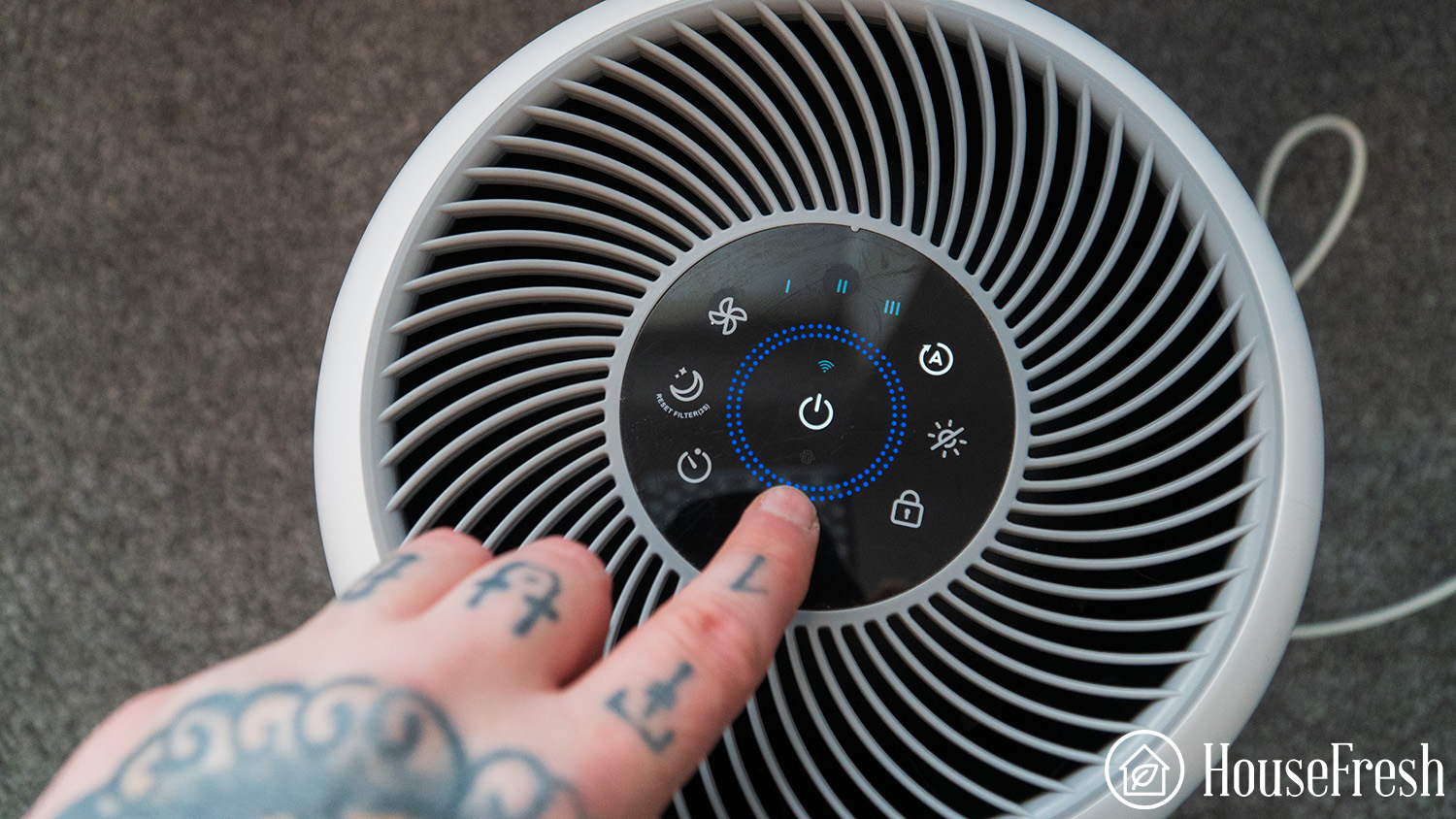
Turn off the purifier and press the filter indicator reset button for three to five seconds.

Levoit Problems Filter indicator needs resetting

For the Levoit PUR-131 and PUR-131S, it’s a little more complicated as you need to use a small screwdriver to hold the internal button for 5 seconds.

Levoit PUR131 Red Light On

Recently our Levoit PUR131 showed the red light, so we got to show you how to fix this issue.

With the air purifier running, you will need to use the reset button on the side of the air purifier and using a small screwdriver, you will hold that button down for at least 5 seconds or until the unit beeps.

Check out the video of me resetting our Levoit PUR131:

Once the button has made a beep, the red light will disappear, and no light will greet you at the top of the air purifier. 

Levoit PUR141 Red Light Off

❓ Are the filters clogged?

Check and replace clogged filters with new filters, if necessary. 

Instructions: 

  1. Open the filter cover and remove the old filter.
  2. It’s a good idea to vacuum the inside of the unit and remove accumulated dust particles, hair, and similar dirt.
  3. Unpack the new filter, insert it into the device and close the lid.
  4. Finally, just reset the filter indicator.

❓ Is there excessive debris in the filter compartment?

Levoit Problems Debris filter compartment

Remove the filter and then remove excess debris from the compartment using a gentle brush or vacuum.

❓ Are there programming issues with the Levoit air purifier?

If you’re still having problems, your air purifier may be running into programming issues. 

Try these steps:

  1. Simply remove power from your unit for around 30 seconds.
  1. Turn on the unit one more time.
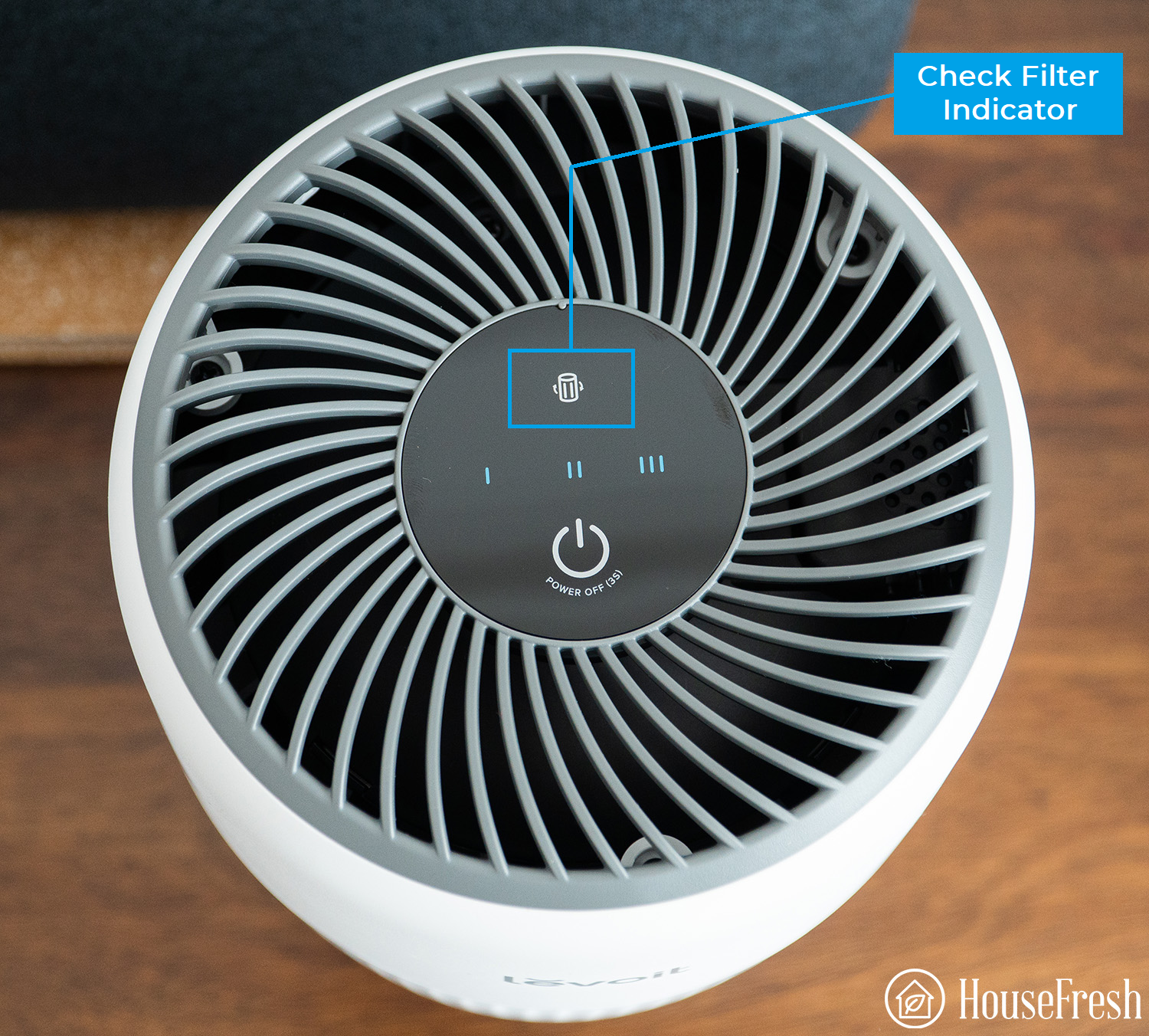
  1. Hold down on the check filter status for three seconds and then monitor the response from the purifier.
Check filter indicator Levoit

Problem 3: I notice reduced airflow

One of the most important things with your purifier is to have optimal airflow, but occasionally this can be diminished for a variety of reasons. 

❓ Is the fan speed set to Low? 

Change the fan speed by tapping the fan speed button and move up from 1 to two or three. 

Tip

Try using the auto mode function to increase the fan speed, this will detect and remove pollutants.

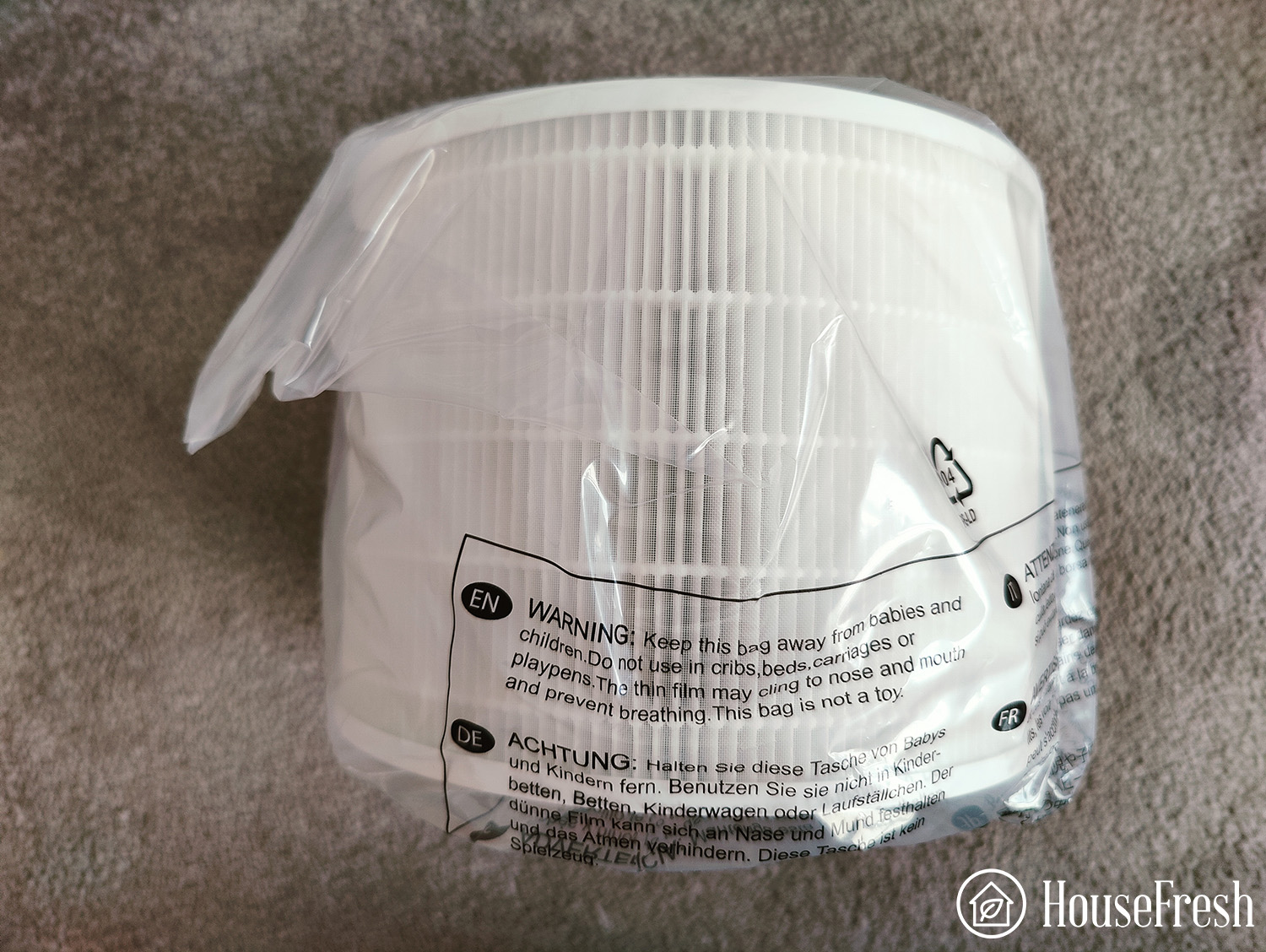
❓ Has the filter packaging been removed?

If you don’t remove all packaging, this can significantly reduce the airflow. Make sure you’ve removed it before operating your unit.

Levoit Core 200S filter in bag

❓ Is there a lack of clearance?

Reduced airflow can occur if the air intake and outlet are placed too close to objects. Simply change your purifier’s location to leave more space around it. 

Air Purifier distance 1

You might feel that the unit isn’t cleaning the air properly when in fact you’re using it in a room that’s too large. Be sure to use the purifier in the recommended room size. This info can be found in the manual. 

Tip

You can access all the user guides and manuals for Levoit units on https://levoit.com/user-manuals 

Problem 4: My Levoit air purifier is making unusual noises or beeping

If you tend to use your purifier while sleeping or resting, you certainly don’t want it to be making strange noises.

❓ Does the filter need changing?

Your Levoit instructions manual can help to ensure you get the correct filter replacement. See our instructions above for detailed guidance on how to change your filters. 

❓ Is there a foreign object inside?

If you find something that shouldn’t be there, turn off the unit and unplug it from the outlet. 

Be sure that you don’t open the air purifier. Instead, contact the support team by phone on 1-888-726-8520 or by email via support@levoit.com, they can help you solve the issue.

❓ Is the back cover placed incorrectly?

Make sure that this is fitted properly.

Levoit 600S Change filter 1

❓ Is there too much dust inside the purifier?

If this is the case, unplug your unit, turn it off and get rid of the excess dust using a vacuum cleaner. 

❓ Does your Levoit air purifier need to be reset?

If you hear a beeping noise while your air purifier is running, it likely needs to be reset. 

Follow these steps:

  1. Ensure the device is plugged in but switched off.
  2. Press and hold the filter reset button for three seconds.
  3. The reset is complete when the light turns off after releasing the button.

If the beeping continues, repeat this process a second time. If you can still hear it, contact customer service as there may be a malfunction. See the bottom of this article for how to contact Levoit Customer Care. 

Problem 5: My Levoit air purifier produces an unpleasant smell during usage

If you can detect an unwanted aroma in the same room as your purifier then the system may be faulty. Yet this isn’t always the case. Sometimes, strong odors and heavy smoke can affect the performance of a unit’s filtration. When this happens, the over-polluted filter gives off a nasty smell.

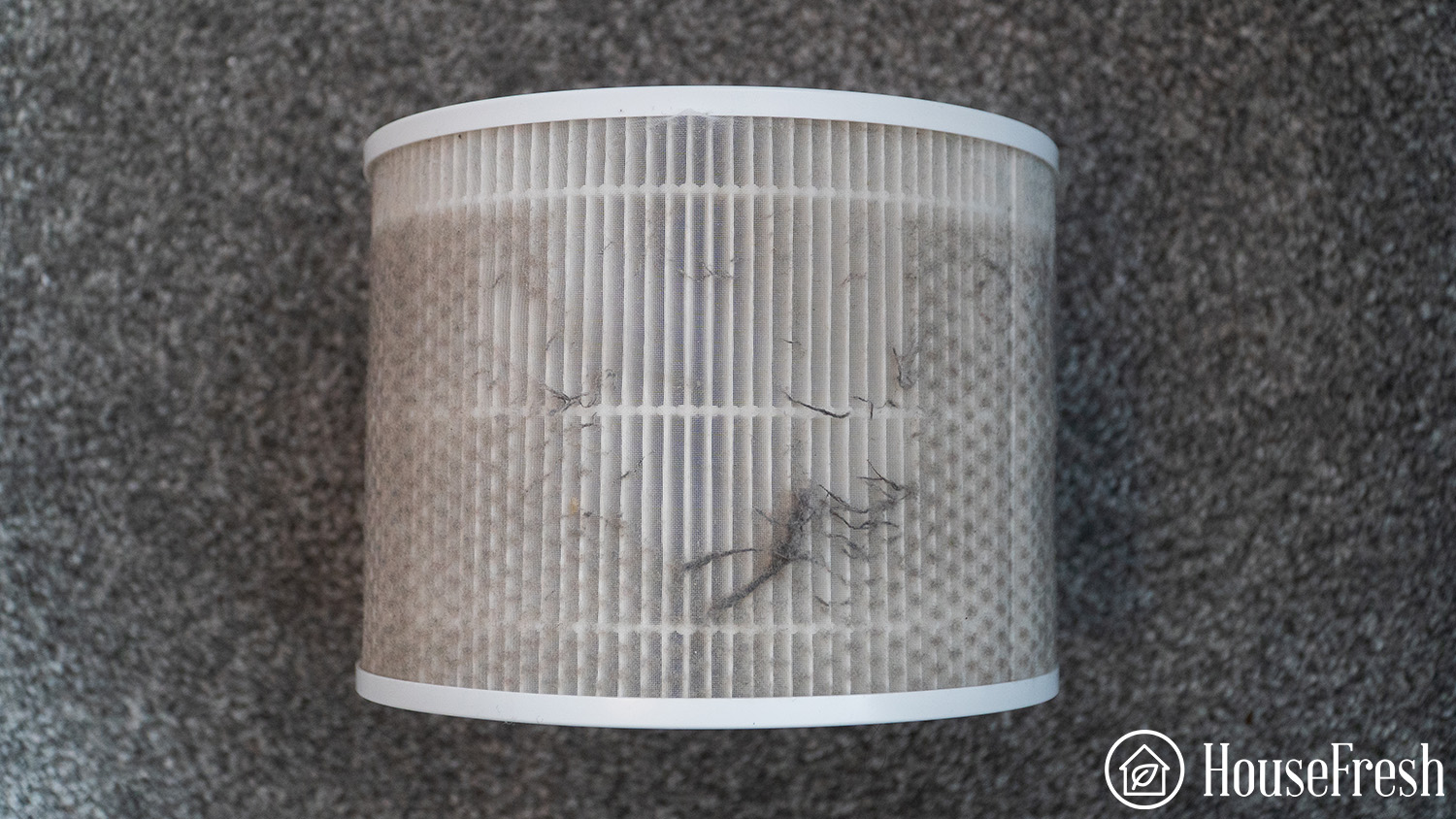
❓ Does the filter need cleaning?

As Levoit air purifier filters aren’t waterproof, you should never wash and reuse them. Instead, try gently blowing compressed air on the unit. 

Levoit Problems Filter needs cleaning

If the filter has been in the system for over six-to-eight months, it’ll be time to replace it.

❓ Is the room adequately ventilated?

To eliminate any strong odors or smoke, be sure to air out the room before running the purifier. 

Tip

Install a vent hood or a ceiling fan in areas such as the kitchen where there are often intense cooking smells and smoke.

❓ Is the filter causing the smell?

Remember that new filters have just left the factory. They haven’t been ventilated, and are immediately packed, so the unpleasant smell lingers in them. 

To combat this problem, leave the unit running for at least 24 hours in an area where you’re not around. This will help to ventilate the filter and make it fresh.

Problem 6: Air purification isn’t working 

When you’ve bought an air purifier, it can be pretty annoying if the unit isn’t cleaning your air effectively. You might be eager to get your system up and running, but it’s vital to read the user manual thoroughly to ensure correct setup. This is often the most common reason why the unit isn’t purifying the air. 

❓ Has dust built up on the filters?

Dust can build up and can cause problems, as we’ve already seen. Remember, you should never wash and resume a HEPA filter

Vacuuming them can cause damage and stop them working. If you really want to try cleaning your filter, be very gentle. But we really do recommend replacing them. 

❓ Is the room coverage too large?

If you use the purifier in a room larger than 300 square feet, it can lead to poor air quality. Be sure to only use it in the recommended room size.

Levoit Air Purifier ModelIdeal Room Size In Square FeetIdeal Room Size in Square Meters
Core 200S≤ 183 ft² ≤ 17 m²
Core 300219 ft² 20 m²
Core 300S219 ft² 20 m2
Core 400S403 ft² 37 m²
Core 600S635 ft² 59 m²
Core Mini178 ft² 17 m²
Core P350≤ 219 ft²≤ 20 m²
EverestAir558 ft² 52 m²
LV-H126158 ft² 14.7 m²
LV-H128≤ 161 ft² ≤ 15 m²
LV-H132129 ft² 12 m²
LVH133442 ft² 41 m²
LV-H134≤ 710 ft² ≤ 66 m²
LV-H135463ft²43 m²
LV-PUR131360 ft² 33 m²
LV-PUR131S360 ft² 33 m²
PlasmaPro 400S403 ft² 37 m²
Vista 200172 ft² / 16 m²
Vital 100≤ 300 ft²  ≤ 28 m²

❓ Is the interior air quality poor?

Air out the room before running your unit. Once the room is well ventilated, close all doors and windows and then run your purifier. 

❓ Is the air inlet or outlet blocked? 

Allow enough clearance around the purifier and remove objects that may block the inlet and outlet.

Is the air inlet or outlet blocked

❓ Is the purifier in the corner of the room?

The instruction manual advises setting up the purifier around the middle of the room for optimum performance. Simply reposition the device and the purification should start working.

Problem 7: My Levoit air purifier isn’t connecting to the app

Successful app connectivity is essential for the smooth running of your purifier, but unfortunately this can sometimes be a problem. 

❓ Are there network problems?

Check that your internet modem is supported and make sure it works at 2.4GHZ. If it works on 5GHz, switch it to 2.4GHz and try connecting again.

❓ Have you entered the wrong Wi-Fi password?

Be sure to check this and also that you haven’t left any spaces at the beginning or end of the password.

❓ Is your VPN turned on during setup?

Ensure that you turn off your VPN throughout this process.

❓ Is the unit too far from the modem?

Make sure that your modem is close enough to the unit to work correctly.

❓ Do you need to use a hotspot?

If none of the above work, try using a hotspot from another smart device as a modem. This should enable you to connect the VeSync app with the purifier.

Problem 8: My Levoit air purifier isn’t connecting to wi-fi

As well as the app, sometimes there can be connectivity issues with the Wi-Fi. It may be that your purifier simply needs rebooting. You can try this, as well as following these tips.

❓ Does the system need restarting?

Unplug it from the outlet for 30 seconds, then plug the unit back in. You should hopefully be able to connect again.

❓ Does the VeSync app need an update?

Open the VeSync app and check if there’s a firmware update available. If so, follow the instructions to update the software. Deleting the VeSync app and reinstalling again can also do the trick.

Levoit Core 600S App 2

❓ Are small appliances creating interference?

Be sure to keep your air purifier a good five feet away from small appliances to avoid interference. 

❓ Is your phone too far away from the purifier?

Ensure that your phone is close to the system. An iPhone has to be within about 33 feet of the air purifier to work. 

Problem 9: The display in my Levoit air purifier isn’t working

While it’s fairly uncommon, issues with the display can occur. The worst outcome is that there’s a malfunction in the system, and a replacement is the only solution. 

❓ Are there power issues with the unit? 

Firstly, connect a different appliance to the outlet and check the response. If the outlet is faulty, all you need to do is to find a different spot for your purifier. 

Tip

It’s best not to leave defective connections unattended when you’re using smart units, so if you can, hire an electrician to help with the wiring connections. 

❓ Is the cord damaged?

If a different appliance works fine with the outlet, then you need to check the power cord for possible damage. When this happens, it’s best to contact Levoit to secure a replacement. 

If you want the issue fixed quickly, taking your unit to a repair center is another option.

❓ Are there programming issues?

Try power-cycling (turn it off and on again) the purifier and then judge the response from the display.

If there aren’t any hardware issues with the control board, shut down the purifier for a few minutes and turn it back on.

❓ Is there water damage?

Levoit units don’t operate well when there’s water damage. In this instance, you’ll have to claim the warranty.

  1. Make sure your product is within the specified warranty period.
  2. Make sure you have a copy of the invoice and order ID or proof-of-purchase.
  3. Make sure you have your product. DO NOT dispose of your product before contacting us.
  4. Contact Levoit Customer Support team via support@levoit.com.
  5. Once the Customer Support team has approved your request, return the product with a copy of the invoice and order ID. 

❓ Does your air purifier need to be reset?

Reset the unit – you could even go back to factory settings – and then try using your display one more time. 

  1. While the unit is on standby, press and hold the filter reset button for 3 seconds. The filter reset button will light up.
  2. Press and hold the filter reset button again for 3 seconds, the filter reset button will now turn off. 

The reset is now complete.

Problem 10: All the lights are on

If you notice that all the purifier’s lights are on simultaneously, this indicates that the device isn’t working effectively. Most likely, it’s a malfunction within the system which can be resolved quite quickly.

❓ Does the unit need resetting?

Hold the power switch down for at least three seconds. Release the button then press down on it once again for a few more seconds. 

If this doesn’t work, hold down the power switch button for five seconds each time.

❓ Does the purifier needs to be unplugged?

Try unplugging the air purifier from its power source for at least 30 minutes and plugging it back in.

Problem 11: The fan in my Levoit air purifier isn’t working

The fan inside the purifier is an integral part of its functioning. If this isn’t working properly, it can affect the purification process. Often, the reason for a defective fan is something to do with the filter. 

❓ Has the plastic packaging been removed?

It may seem obvious but make sure that you’ve removed all plastic packaging from the filter. Similarly, it’s important to check that you’ve installed the filter correctly.

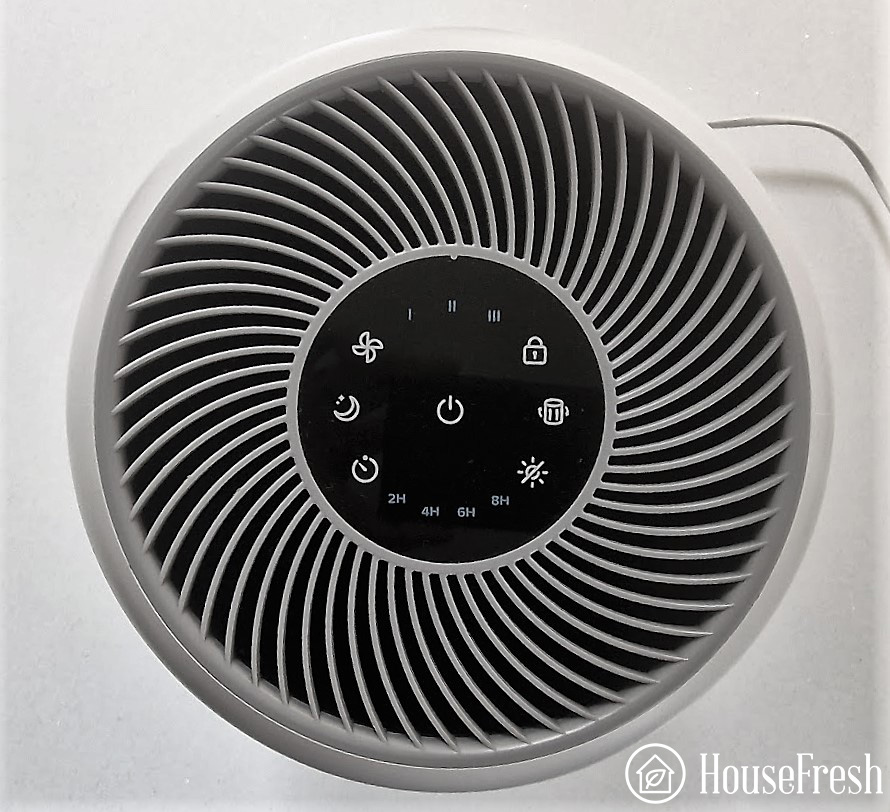
❓ Do you need to touch the fan icon?

Again, this may feel like a no-brainer but double-check that you’ve touched the fan icon on the display. Doing so means you will increase the speed of the fan.

Levoit Core 300 Control panel

❓ Is the Levoit air purifier in sleep mode?

This means that the fan will work as quietly as possible. To turn this off, simply press the sleep mode button icon.

❓ Are there any objects blocking the sides of the purifier?

It’s important to remove all existing things and objects from the sides of the purifier. As we mentioned earlier, this can prevent the device from working properly.

Problem 12: The air quality indicator shows the wrong status

It’s quite common for users to find that the air quality indicator displays the incorrect status, so don’t worry. Most of the time, the indicator is malfunctioning because there’s a problem with the dust sensor.

❓ Does the dust sensor need cleaning?

If the indicator keeps showing the red light, this is supposed to tell you that the air quality is bad. Yet if you’re running the purifier at full capacity, it probably means you need to clean the dust sensor. 

Follow our step-by-step guide:

  1. Firstly, open the sensor cover to access the air quality sensor.
  2. Using a damp cotton swab, clean the sensor lens.
  3. Dry the sensor lens thoroughly with a dry cotton swab.
  4. Close the sensor cover.

How to contact Levoit 

If you’ve tried our suggestions to fix your problem but are still experiencing issues, then don’t worry because Levoit customer support is ready to help. 

Their experts are available Monday through Friday, from 9am to 5pm PST. You can reach them by phone on 1-888-726-8520 or by email via support@levoit.com. You can also use their instant chat function which will enable you to describe the problem as well as submit attachments such as photos. 

Alongside these options, you can simply send a message on their Contact Us page. You’ll be asked to input things like your order number and what you’d like to discuss. 

Find the manual for your Levoit air purifier 

You may have purchased your Levoit purifier some time ago and now the manual seems to have disappeared… But never fear because Levoit has got your back. Download the manual for your unit below. 

Air purifier Manual
Core 200SDownload here
Core 300Download here
Core 300SDownload here
Core 400SDownload here
Core 600SDownload here
Core MiniDownload here
Core P350Download here
EverestAirDownload here
LV-H126Download here
LV-H128Download here
LV-H132Download here
LVH133Download here
LV-H134Download here
LV-H135Download here
LV-PUR131Download here
LV-PUR131SDownload here
PlasmaPro 400SDownload here
Vista 200Download here
Vital 100Download here

Final thoughts

If you want to improve the air quality inside your home, you won’t go far wrong with buying a Levoit purifier. However, there are some common problems that users experience from time to time. For example, the unit won’t turn on, or there’s a continuous beeping sound. 

Fortunately, and in many cases, the issue can be resolved through simple actions such as changing and/or cleaning the filter, and moving the unit to a different part of the room. In more serious instances, however, help is always on hand from Levoit themselves, either via their user manual, or from their dedicated customer support services.

SOURCES

How to test air quality in your home

Aranet4 Home Sensor Room3

Air is so fundamental to our existence we rarely think about it—until it turns against us. Poor indoor air quality (IAQ) affects your quality of life and the enjoyment of your home More importantly, it can affect your health and the health of your family, producing symptoms including:

  • Coughing and congestion
  • Fatigue and dizziness
  • Frequent respiratory illnesses
  • Chronic headaches
  • Allergic reactions (itching, watering eyes, runny nose, sore throat)
  • Nausea
  • Skin irritation
  • Chest pains and increased heart attack risk

These risks make regular monitoring and testing of the air quality in your home a necessity. The good news is that there are a lot of technological solutions that can help you do this—and the signs are often clear enough to be detected without any assistance at all.

How to test air quality in your home using technology

If you suspect that the air quality inside your home isn’t ideal, or if you’re moving into a new property and want to conduct air quality testing as part of your due diligence, there is a lot of technology at your disposal:

1. Air quality monitors

There are a wide variety of air quality monitors available for purchase, ranging from portable units you can bring with you to different locations to more permanent solutions. The key is to ensure that the monitor you choose tests for any specific pollutant you suspect may be in your air, including:

  • Particulate matter
  • Volatile organic compounds (VOCs), e.g. formaldehyde
  • Carbon dioxide (CO2); Carbon dioxide can cause many health problems, including headaches and drowsiness, shortness of breath, cognitive dysfunction, increased heart rate, elevated blood pressure, and arrhythmias.

2. Mold tests

Mold is a constant threat in any indoor area. High humidity levels or standing water from leaks or minor flooding can encourage the growth of a wide variety of molds that can cause severe health issues. A reliable mold testing kit can be purchased at most home improvement stores or online, and regular use can keep you informed about the safety of your indoor air.

3. Carbon monoxide (CO) detectors

Carbon monoxide can lead to death by suffocation–in fact, every year more than 400 people die from CO poisoning.

4. Radon detectors

Radon is a colorless and odorless gas that is the number one cause of lung cancer in non-smokers, causing more than 20,000 deaths each year. While most home inspections include a radon test, regular monitoring is advisable.

5. Asbestos tests

Asbestos, a group of fibrous minerals that were once heavily used in insulation applications due to their fire-resistant properties, has been strongly linked to a type of cancer called mesothelioma. If your home was built prior to 1989, when asbestos was banned from use, you can use a home testing kit to determine if there is any asbestos risk.

Tip

If you’re not sure what pollutants you should be concerned about in your home, or if you prefer to have a professional conduct a comprehensive check of the home’s indoor air quality, you can identify reputable air quality professionals by contacting the American Industrial Hygiene Association or the American Board of Industrial Hygiene
A professional air quality assessment can be very expensive, however, and in most cases consumer air quality monitors and test kits are sufficient to assess your home’s air quality.

How to test air quality in your home without technology

While monitoring devices and testing kits can confirm poor indoor air quality, the signs are actually easy to spot without the aid of any technology at all. 

If you’re experiencing symptoms that make you suspect poor IAQ, you can undertake a two-pronged investigation to determine whether you need to worry about the air in your home.

Step 1: Visual inspection

Pollutants in the air always have a source. While some pollutants, such as gases or particulates from wildfire smoke, can enter from outside the home and be difficult to see, many causes of poor air quality can be identified simply by conducting an inspection of the home, including

  • Mold. Mold is often very easy to see, appearing as a discolored, textured growth on walls and in cracks and crevices.
  • Pet dander. If you own a pet, shed hair, fecal matter, and other particulates will typically be visible in the air or collected on floors and in corners. If you see pet dander, it’s a sign you need to upgrade your vacuum and perhaps increase your cleaning schedule.
  • High humidity or standing water. If you see condensation on the inside of windows or have chronic issues with water leaks or puddling, there could be hidden mold growth you’re unaware of.
  • HVAC filters and vents. Inspect your heating and air-conditioning filters and vents for any buildup of dirt, dust, or other contaminants.
  • Stored compounds. Old paint or solvents can off-gas, polluting your indoor air.
  • New carpet or upholstery. Many treated fabrics can off-gas VOCs which can degrade your indoor air quality.

If you see any of these signs, consider investing in an air quality monitor or conducting some specific air quality testing.

Step 2: Personal health assessment

Your body is also a very good gauge of the air quality in your home. If you routinely experience symptoms that could be linked to poor indoor air quality, track your experiences by keeping a journal for a few weeks. 

Look for patterns:

  • Do you experience symptoms in a certain room, such as a home office? 
  • Do your symptoms improve or vanish when you leave the home? 

If so, you have a strong clue that there is an issue with the air quality in your home.

Final thoughts

The air we breathe has a profound impact on our health and our quality of life. Your home is where you sleep, where you share moments with your loved ones, where you build your future. Any compromise to indoor air quality is dangerous—but you need to be aware of a problem before you can rectify it. Installing an air quality monitor and conducting specific testing to ensure your home’s air is clean and healthy to breathe isn’t just about property values or even your day-to-day comfort. It’s about your future—and your family’s future.

SOURCES

How to smoke weed inside without leaving a smell

How to Smoke Weed 04

Nothing beats rolling one up and taking a hit after a long day. But for some of us, smoking weed is more akin to a covert operation than the relaxing experience it should be. Despite a recent wind of change bringing in new, more open-minded attitudes and laws surrounding smoking pot, it’s still far from being widely accepted in mainstream society. 

Whether you are concerned about your neighbors, family, or even law enforcement catching the scent of your joint, or perhaps you’re just tired of your home smelling stale after smoking weed, we’ve put together some top tips on how to smoke indoors without leaving a trace. 

In order to smoke weed indoors without leaving a smell, you will need to take a few precautionary steps before and after lighting a joint. By finding the ideal space, preparing the room, and removing smoke once you’ve finished, you can be confident you will eradicate any unwanted odor and keep your space feeling fresh.  

Before you smoke: How to choose the best area for smoking weed indoors

How to Smoke Weed 03

First things first, you’ll need to find the perfect pot-smoking spot. Now I know most of you will be heading straight to the comfiest seat in the house, ready to relax in style within close proximity to both the TV and fridge. However, this probably isn’t going to help keep your space odor-free. 

In order to prevent smells from traveling around the house, follow these tips to find the best area for smoking weed indoors.

1. Consider the location of the room and who else might use it

If you’re trying to smoke without affecting other people in your household or alerting an angsty neighbor, avoid communal areas or places where smoke will travel into other people’s personal space. This common courtesy is rule number one when smoking as the last thing you want to do when getting high is annoy the people around you.

Tip

Designate a specific smoke-friendly room and only light up in there to limit the smell of weed taking over the whole house.

2. Be aware of your surroundings

Scan any potential room and avoid areas with lots of soft furnishings or pristine white walls. Carpets, drapes or throws will absorb odors over time and will begin to stink of weed smoke. While walls and ceilings that are painted white can soon become discolored, which is the first thing your landlord will notice, so you can kiss your security deposit goodbye.  

3. Head to the bathroom

This room is almost tailor-made for smoking indoors. As most bathrooms have tiled walls or a linoleum floor, you can rest assured these surfaces won’t absorb odors. As bathrooms have excellent ventilation too, just switch on the extractor fan or open the window and you’re good to go.

Tip

Run the shower and allow the room to steam up, this will help quash smoke and minimize any odor.

While you smoke: How to prepare the room before lighting a joint inside

How to Smoke Weed 02

Once you’ve found the ideal spot, it’s now time to take a couple of precautionary measures to minimize the spread of smoke and ensure you don’t give the game away. 

1. Ventilate the space

Nothing rids odors as effectively as flooding the room with fresh air. Open any windows and doors within your immediate vicinity to increase airflow and allow smoke to dissipate.

Tip

When smoking, try to be as close to the window or door as possible and exhale directly outside.

2. Close interior air vents 

Your HVAC system is responsible for circulating air throughout your home. So when smoke is present indoors, it can enter the duct system and travel from room to room. By closing the vent in the specific room where you are smoking, you will isolate any odor to that room. Most vents have a small sliding mechanism, which allows you to easily open and close the vent. 

3. Seal gaps between doorways

If you want to stop smoke from spreading from one room to another, temporarily place a rolled-up towel at the base of your doorway. This will block a good section of space where smoke and odors would otherwise pass through.

Tip

Damp the towel slightly before placing it at the door for extra odor absorption.

After you smoke: How to get rid of weed smells after smoking indoors

How to Smoke Weed 01

Admittedly, the last thing you’ll want to do is carry out more precautionary steps once you’ve smoked your joint. But it’s important to rid the room of any smoke before it spreads, or seeps into any soft furnishings. So, before you relax, follow these quick, final steps to rid your room of weed smoke.  

1. Turn on your air purifier

When it comes to removing traces of weed smoke, an air purifier recommended for weed should be your first port of call. Ensure it comes with a heavy-loaded Activated Carbon filter, which targets volatile organic compounds (VOCs), such as odors, along with a HEPA filter which helps remove harmful smoke toxins.

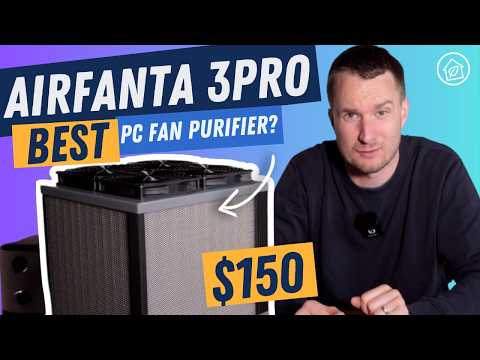
In our study of the best air purifiers for weed smoke, we found that the Airfanta 3Pro with carbon filters provides great support for a really good price.

airfanta 3pro video housefresh
Tip

Be sure to leave the purifier running for an hour or two so it can carry out multiple air cycles.

2. Invest in Activated Charcoal bags

Much like the filter in your air purifier, Activated Charcoal bags are filled with carbon that adsorbs gasses and odors, eradicating them from your space. These offer an excellent, budget-friendly alternative, however, they are only effective in an immediate range as they have no means to circulate the air.

Tip

Place numerous bags around the room and target desk fans towards them to increase their efficiency.

3. Remove the evidence

Leaving the end of joints to sit in your ashtray will only continue to emit odors into your home. Ensure they are stubbed out and thrown away as soon as you’re finished to cut smells off at the source. Likewise, pack away all your weed in airtight containers to stop smells spreading.

Tip

Invest in a sealable ashtray so all you have to do is pop the lid on until you are ready to dispose of any waste.

4. Light a scented candle or use an essential oil diffuser

Although these will only temporarily mask the smell, they offer a short-term solution to covering up the smell of weed, which is especially useful if you are expecting visitors.

Frequently asked questions about smoking weed indoors

Trying to secretly smoke in your room is probably going to end in you getting busted, despite how good our odor-eliminating advice is 😉. So it’s best to be open and honest from the outset or smoke elsewhere. 

However, if you are hell-bent on secretly smoking indoors, ensure you maximize ventilation and airflow in your space, either by opening a window or utilizing an air purifier. Remember smoke travels easily and its odor can become absorbed by your bedding, carpet or drapes so be sure to block any spaces where smoke could escape into the rest of the home and eradicate any reminisce of smoke right away. It’s probably best to avoid masking the odor with air freshener too, as this might draw unwanted attention. 

This will vary depending on the room you are in and how you smoke weed. If your space is full of soft furnishings and you’ve smoked with the windows closed, you can expect the odor to linger a lot longer than if you smoked in a well-ventilated kitchen or bathroom. 

Whether you smoke a joint, bong, or pipe will also affect the longevity of lingering odors too. A pipe or bong uses relatively small amounts of combustible material, so they will emit less odor than a joint (especially if rolled using tobacco).

Generally speaking, if you smoke a joint or two indoors without following our odor-busting advice, the smell can remain for a day or two before returning back to normal. Regular smoking indoors will contribute to a constant odor in your home, which smokers often become nose blind to. 

Vaping is much more odor-friendly than smoking combustible joints, bongs or pipes. Providing a more discreet way to smoke. As vapor is less dense than smoke, it dissipates far quicker so won’t leave as much of a lingering smell in your home. However, over time it can attach to soft furnishings and belongings and may pose more of an odor issue in the long run. Be sure to check out our top air purifiers for vaping to keep your home smelling fresh for longer. If its cigarette smoke as well then look at higher powered units in our list of the best air purifiers for smokers.

Final thoughts

The lingering odor left from smoking weed can turn your home into a stale, smelly environment. Not to mention it can be a nuisance to your family, roommates or neighbors. By increasing natural ventilation or investing in an air purifier loaded with Activated Carbon filters, you can dramatically reduce any unwanted odor and create a fresher environment. 

It’s important to state that the smoke produced from burning weed has been shown to contain many of the same toxins, irritants, and carcinogens as tobacco smoke. Prolonged exposure or persistent inhalation of weed smoke can result in serious health complications, where the smell it creates will be the last of your worries. However, if you are going to continue smoking weed, by following each of our top 10 tips, you will not only reduce the odor but lower the risk of secondhand smoke for those around you. 

How to clean a dehumidifier filter

Featured Image

Dehumidifiers are extremely effective at improving indoor air quality. They reduce the level of humidity and have become difficult to live without in the home. But did you know that dehumidifiers need cleaning and maintaining on a regular basis, especially those that have an air filter? 

An air filter plays a fantastic role in tackling mold and condensation, but after a while, your unit may not be as effective as it was from the start. This is probably because your filter is in need of a good clean. Your filter can be removed and washed easily, allowing your unit to perform to its maximum potential once again.

Why could a filter need cleaning?

An air filter’s purpose is to pull contaminants out of the air, so as you can imagine the filter can get very dirty in a short space of time. Failing to keep your machine’s filter clean will evidently result in poor performance, lack of general efficiency, and will waste energy which, in turn, will cost you more money to run. 

A dehumidifier filter’s lifespan will be determined greatly on how well you take care of it. You wouldn’t let your plants go without water, or have your car run without engine oil, so be sure to clean your filter to give you the best possible results and improve your home environment. 

How to clean a dehumidifier filter: A step by step guide

If your home is starting to show signs of dampness, rot, or evidence of dust mites again, don’t be so quick to dispose of your dehumidifier to buy a new one. It could simply be a case that the air filter needs cleaning.

Here are some useful tips that will help you maintain your product’s filter to put a stop to any problematic development.

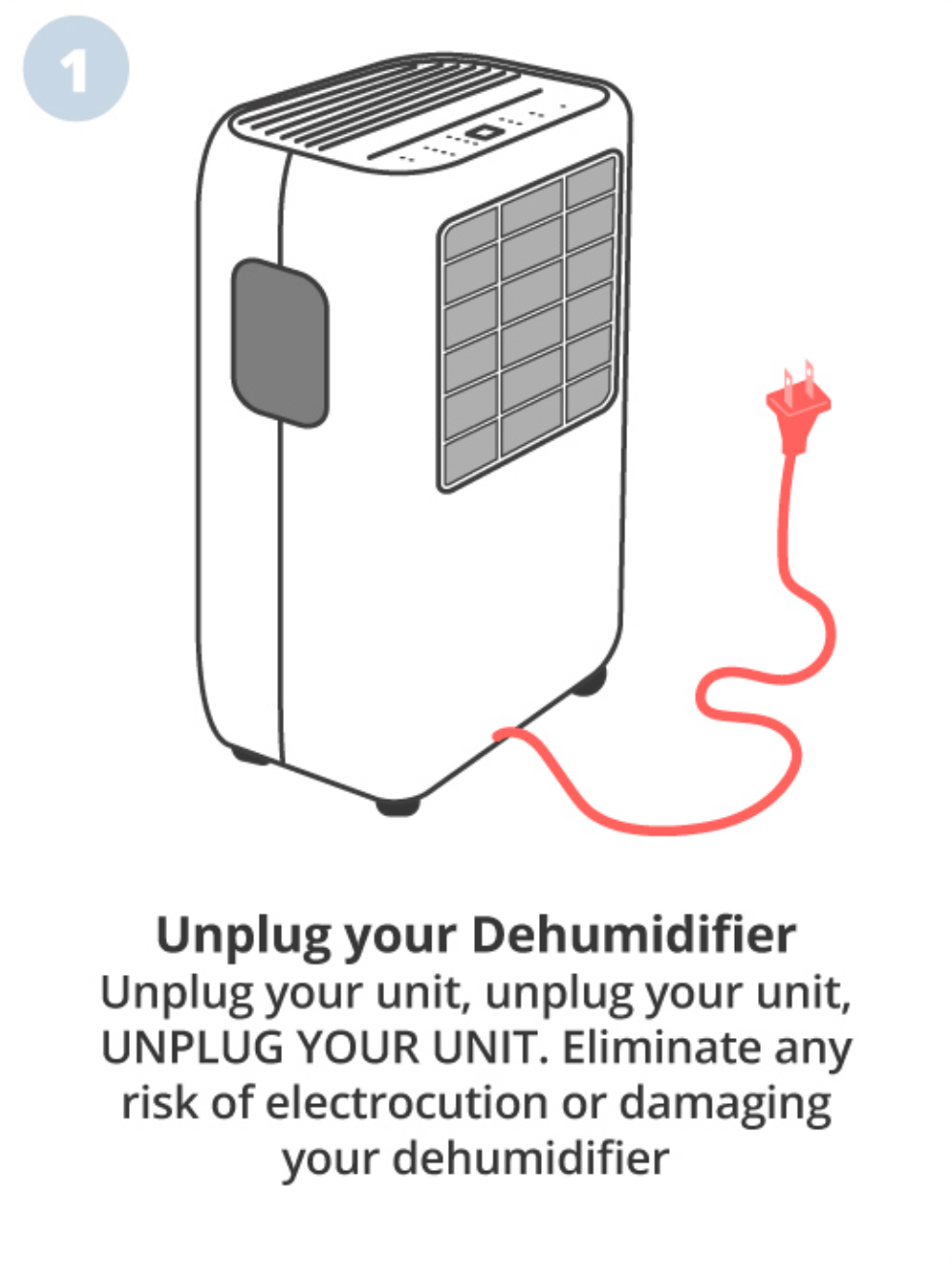
1. Unplug your dehumidifier

The very first thing you need to do is to switch off and unplug your dehumidifier. Remember, a dehumidifier deals with moisture and water, which doesn’t exactly mix well with electricity. You want to exclude any risk of being launched across the room from an electric shock, or permanently damaging your unit by exposing its circuits to any moisture contained in the filter when removing.

How to Clean Dehumidifier Filter Step by Step 1

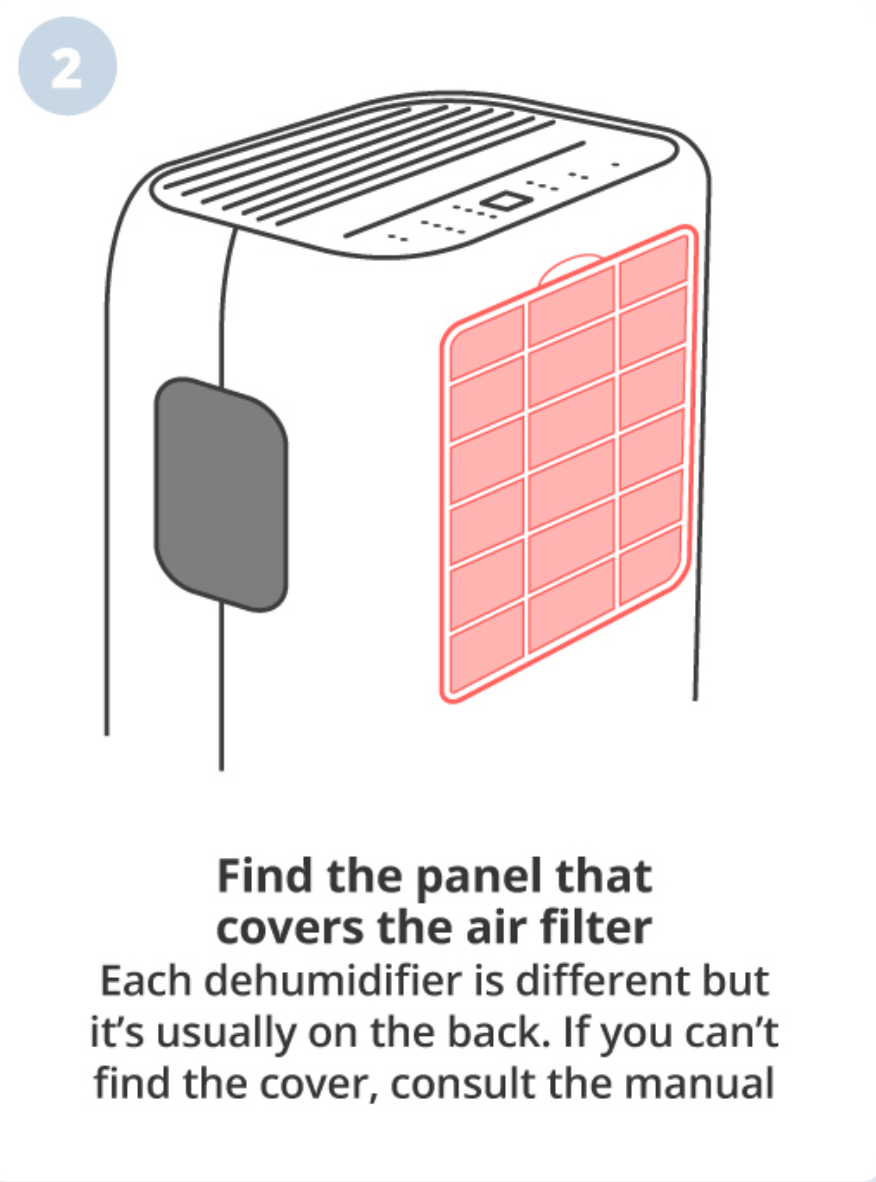
2. Find the filter cover panel

A lot of dehumidifiers are different but most have the same setup for cleaning the air filter. Seek out the panel at the back of your unit that covers the air filter and carefully remove it. The filter should be staring right at you, however, be sure to check the unit’s instructions or look for a guide on YouTube to find the best approach for your model to avoid any damage.

How to Clean Dehumidifier Filter Step by Step 2

3. Remove the filter

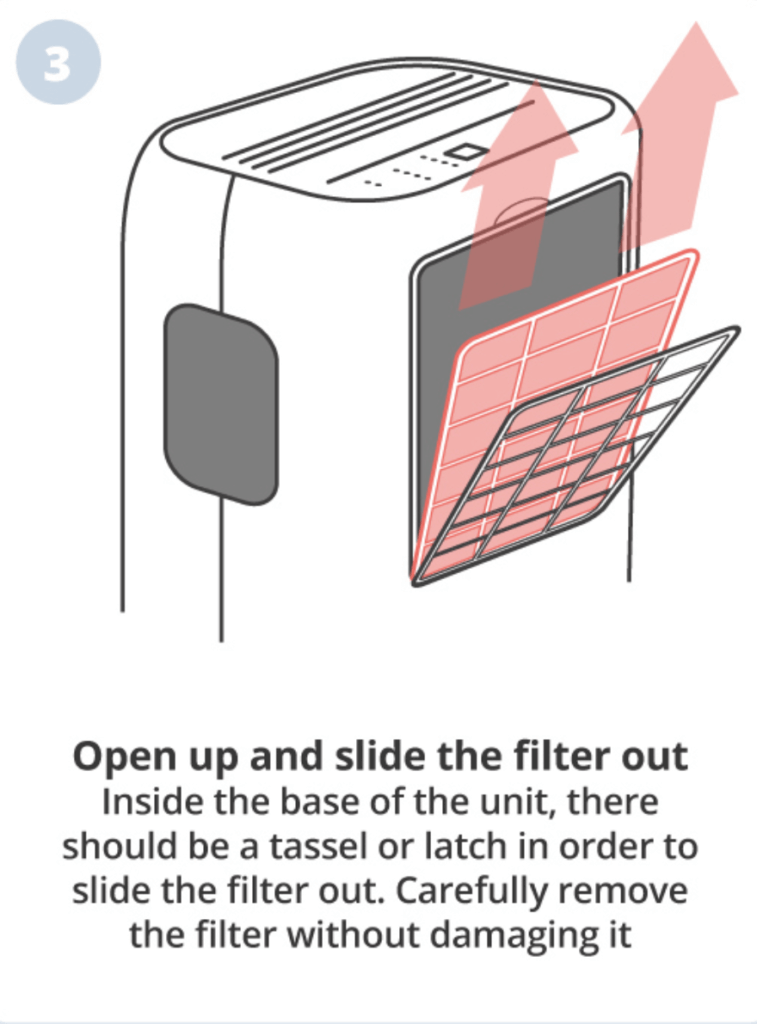
Depending on the unit, the filters are usually located within the core of the dehumidifier. You may need to remove the water tank in order to slot the filters out. Generally, dehumidifier filters have a tassel that is found towards the top, simply pull on the tassel and the filter should become loose, making them easy to remove. Be wary of any hanging wires and electrics when removing the filter. We always suggest consulting the manual first.

How to Clean Dehumidifier Filter Step by Step 3

4. Washing your filter

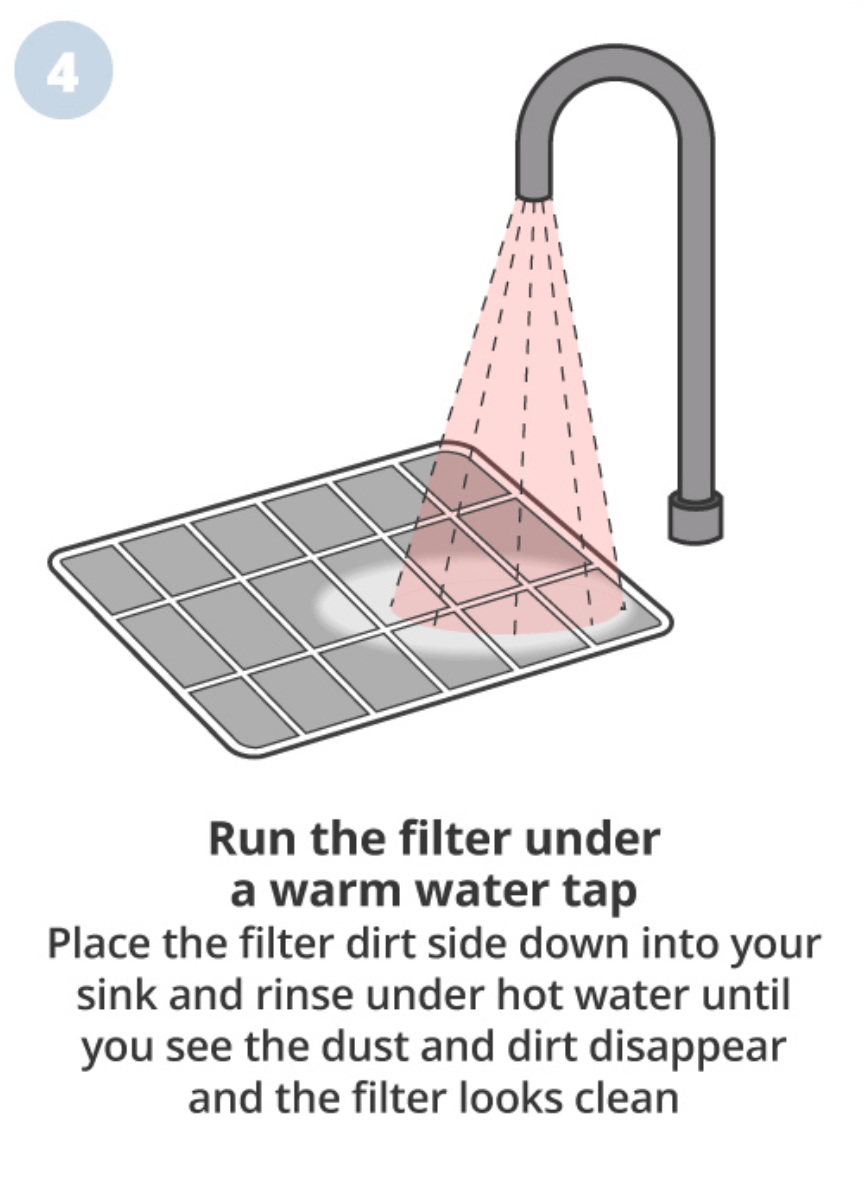
If this is the first time cleaning your filter it can appear filthy. Don’t worry, that just means your dehumidifier is doing its job. Place the filter dust side down in your sink and rinse with hot water,  move the filter around in your hands under the tap in order to remove the dust and dirt efficiently (if you have access to a flexible spray tap, it makes everything much easier). Dehumidifier filters are washable and reusable so keep an eye out for any breaks or tears in the material, this may be an indication that you need a new one.

How to Clean Dehumidifier Filter Step by Step 4

5. Drying your filter

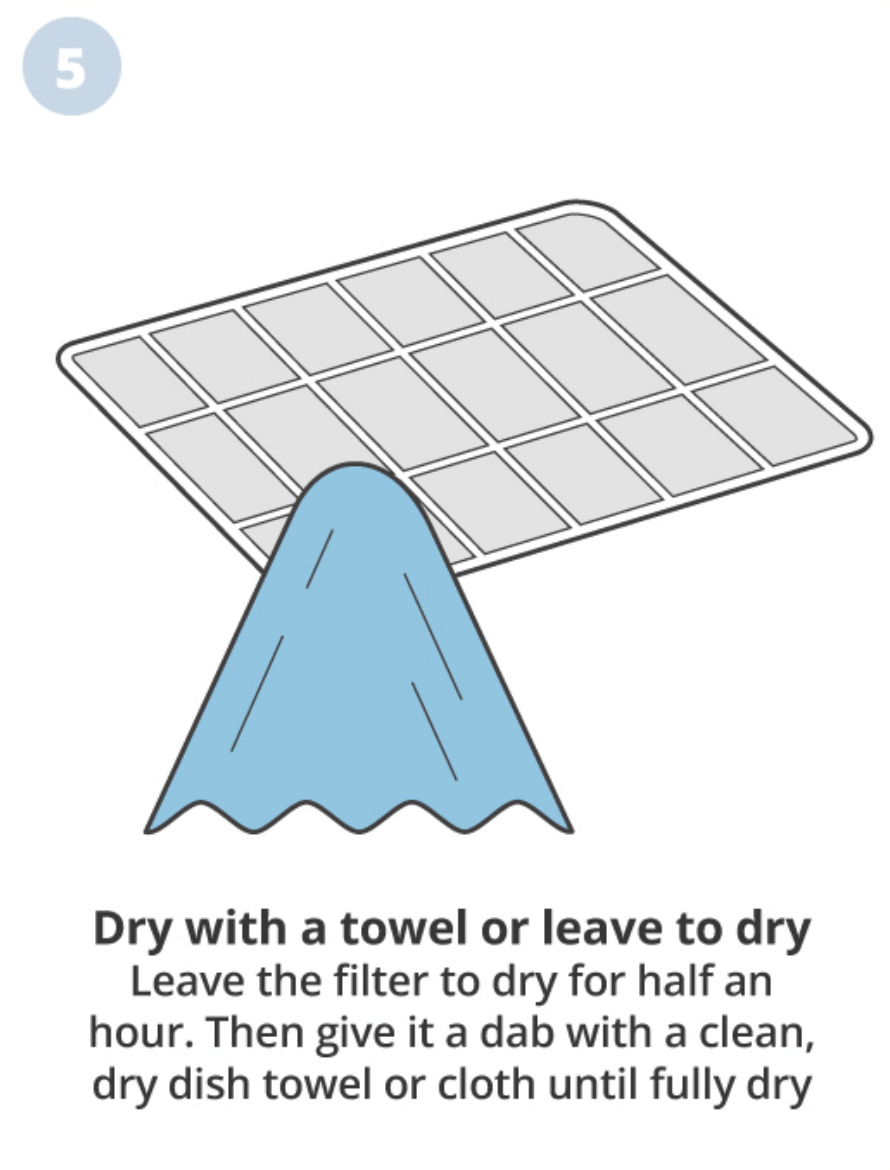
Once you have removed all the dust and dirt from your filter you need to leave it to dry for around half an hour before giving it a thorough dry with a dry cloth or dish towel. Again, be careful not to rip or tear the filter whilst drying. With all the moisture removed, your air filter is now ready to place back into the dehumidifier.

How to Clean Dehumidifier Filter Step by Step 5
Tip

Some units come with filters on both the front and back. Be sure to check your manual so you’re not doing half a job. 

6. Placing the filter back in your dehumidifier

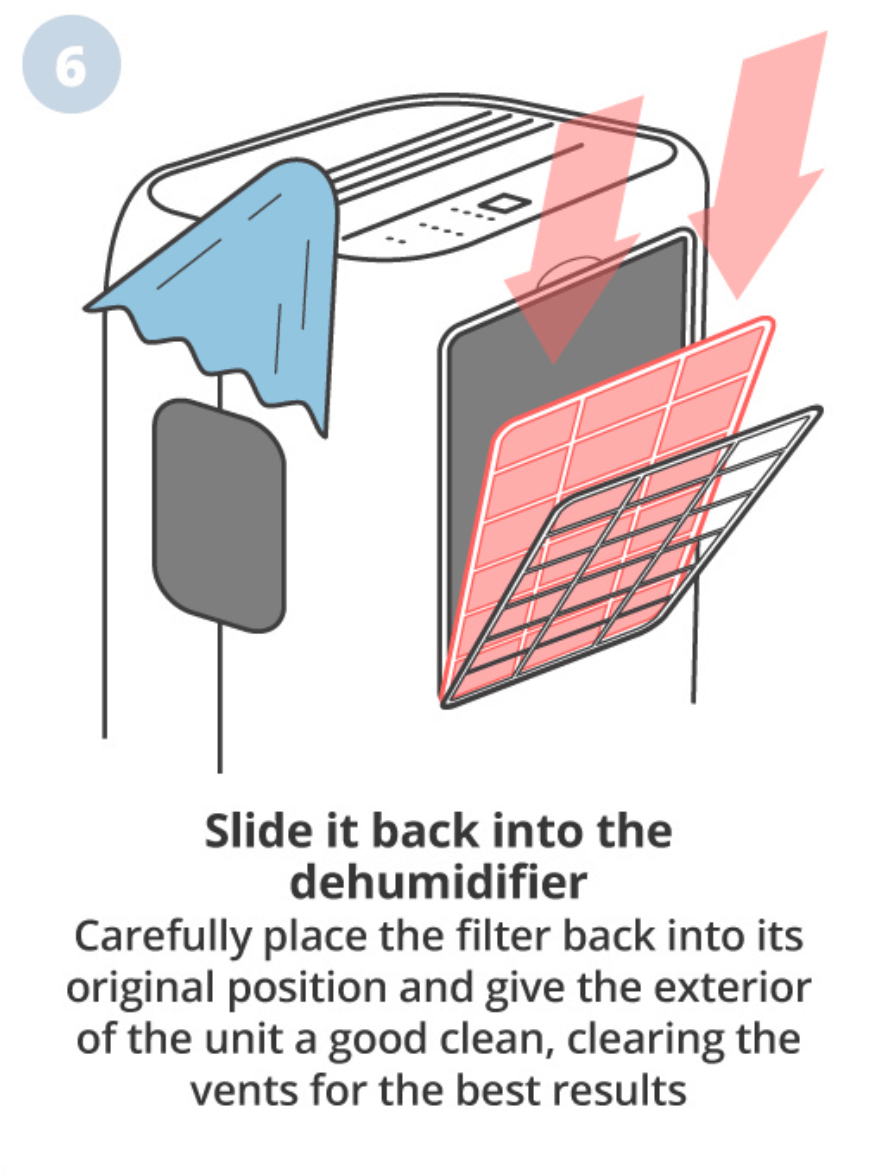
Placing your filter back into your machine is as simple as it was to remove. Slot the filter into its place, making sure it’s in the right position making sure it isn’t loose or wobbly. Don’t force anything and risk damaging your unit. 

How to Clean Dehumidifier Filter Step by Step 6

You will probably notice that your filter is now sparkling but your unit isn’t. You’ve already come this far, you might as well give the whole dehumidifier a clean to fully maximize its efficiency. Follow our step-by-step guide on how to clean and maintain your unit to avoid any further moisture issues or having to shell out for a new one.

Final thoughts

Cleaning your air filter is paramount. If you want your dehumidifier to work to its maximum potential, it is recommended that the filter(s) are cleaned once every 2-3 weeks. This can vary depending on how high humidity levels are, or how frequently your unit is used, but as long as you keep on top of the maintenance you should not be concerned about performance.

Dehumidifiers are put under a lot of pressure, tackling excess moisture on a daily basis which takes its toll. Keeping your unit well maintained doesn’t only improve performance but will save you from buying a new one whenever there is a problem.